Showing posts with label Talend. Show all posts

Thursday, November 14, 2013

Talend Error - Unable to generate a job on TAC

Check to see if the user under the Settings --> Users --> SVN credentials are properly configured and saved.

You run into the, "Unable to generate a job"  error even when you do not have compilation issues is due to connectivity to the SVN.

Happy Talending!
Praveena

Talend - Cannot import jobs Error

Sometimes, when you login into a project, you might not be able to import jobs to a project. The import option is completely grayed out in the "Project" Menu or the context menu of Jobs. This happens if you are not authorized as a user in the project on TAC. To solve this problem, request your Talend Administrator to authorize you as a user of this project.

Login into TAC.
Under Settings Menu ---> Choose Project Authorization --> Add a user to the project that you need IMPORT permissions on. You could drag-and-drop the users to a project on this page.

Happy Talending!
Praveena

Thursday, October 31, 2013

How to run Jobs remotely on TIS?

If you have JobServer installed on your box, then running Jobs remotely involves two steps.

1) Configure your TIS to point to the remote Job Server
2) Run the Talend Job fro the studio on the remote Job Server.

Once you configure your remote job server in the TIS preferences, you can run the job remotely by configuring the Target Exec tab of "Run" Talend Job.


I do not have Job Server installed. But if you do, you could run the Talend Job from your local studio on a remote server. Very handy!

Happy Talending!
Praveena


How to capture Talend Job Activity into databases - Activity Monitoring Console

It is often useful to capture the statistics of a job to monitor the job performance and error codes. Talend has three ways to capture this information.

  1. On console
  2. In FileSystem
  3. On Databases
My personal choice is to capture the logging information in a database since it will be very useful to store history and easy to track the trends of the job activity with a query. This could be very handy to identify any performance bottlenecks.

So here are the table definitions for the logs, stats and volume catchers used by the AMC. You can easily get these definitions by exporting the meta-data from tlogcatcher, tflowmeter and tstatcatcher to Generic Schemas in the repository and reusing them later. Here they are served without going through the pain of creating the metadata again :)

Create these tables on your database and configure your project to capture this information in the database so that the AMC can retrieve this info from database and display it for you.


CREATE TABLE [dbo].[logCatcher](
[moment] [datetime] NULL,
[pid] [varchar](20) NULL,
[root_pid] [varchar](20) NULL,
[father_pid] [varchar](20) NULL,
[project] [varchar](50) NULL,
[job] [varchar](255) NULL,
[context] [varchar](50) NULL,
[priority] [int] NULL,
[type] [varchar](255) NULL,
[origin] [varchar](255) NULL,
[message] [varchar](255) NULL,
[code] [int] NULL
) ON [PRIMARY]

GO

CREATE TABLE [dbo].[flowMeter](
[moment] [datetime] NULL,
[pid] [varchar](20) NULL,
[father_pid] [varchar](20) NULL,
[root_pid] [varchar](20) NULL,
[system_pid] [bigint] NULL,
[project] [varchar](50) NULL,
[job] [varchar](50) NULL,
[job_repository_id] [varchar](255) NULL,
[job_version] [varchar](255) NULL,
[context] [varchar](50) NULL,
[origin] [varchar](255) NULL,
[label] [varchar](255) NULL,
[count] [int] NULL,
[reference] [int] NULL,
[thresholds] [varchar](255) NULL
) ON [PRIMARY]

GO


CREATE TABLE [dbo].[statCatcher](
[moment] [datetime] NULL,
[pid] [varchar](20) NULL,
[father_pid] [varchar](20) NULL,
[root_pid] [varchar](20) NULL,
[system_pid] [bigint] NULL,
[project] [varchar](50) NULL,
[job] [varchar](50) NULL,
[job_repository_id] [varchar](255) NULL,
[job_version] [varchar](255) NULL,
[context] [varchar](50) NULL,
[origin] [varchar](255) NULL,
[message_type] [varchar](255) NULL,
[message] [varchar](255) NULL,
[duration] [bigint] NULL
) ON [PRIMARY]

GO

These table definitions are for SQL Server.

Happy Talending!
Praveena

Diff Tool in Talend - Compare Jobs

Often times, we need to do a comparison between different versions of Talend Jobs. It could be for troubleshooting purposes or for logging the "Release Notes" for developers to help with maintenance.
A very useful feature for diffing purposes is "Talend's Compare Job" available only in TIS. This could save lot of time for developers to understand what has changed (especially with minor changes) without even opening the job.

Screenshots follow.


The save to HTML file is very useful when we are trying to log all the changes in a release by running the diff on the DELTA of files that have been modified in a release.

Happy Talending!
Praveena


Talend Migration from 4.X to 5.X

Recently, we started working on Talend Migration from 4.X to 5.X. One biggest surprise we encountered was, the Talend migration of jobs happens automatically without a message for confirmation.

Something in lines of "The migration is about to start. Do you want to proceed, Yes/No"

This means that if you opened a Talend 4.X job in TIS/TOS 5.X studio, the job is automatically migrated to 5.X. Since, we had an unplanned/accidental migration, we had to revert the code back to 4.X in sub-version. But we had several issues when reverting the code back. This post is to share our experiences about the migration.

Cannot find Talend.Project error. Classic error!! If you look in your subversion, you would see the talend.project file but the studio complains that it cannot find it. We still do not know which one action solved this error but doing the following helped us resolve the error.


  1. Release all the locks in Talend using TAC.
  2. Make sure that the project url to subversion is reachable.
  3. Make sure that the account used to add a project in subversion has sub-version access privileges to the project.
  4. Make sure that the project references has the authorization set up properly.
  5. Make sure that the subversion url is valid and the credentials are good.
  6. Make sure each user in the TAC has an svn login configured.
Cannot give a detailed screenshots for this exercise but let me know if you run into a similar issue during migration. Would be happy to help!

Error - Talend.Project doesn't exist


Happy Talending!
Praveena


Tips to interact with Databases efficiently using Talend

TIPS to interact efficiently with Databases using Talend

  1. In the Database Output component choose the "Enable Parallel Execution" (Last option in the Advance Settings)
  2. Use a reasonable batch-size (The default is 10,000 rows)
  3. Use the ELT components and Bulk Execute components where ever applicable.
  4. Choose only the columns you are interested in your data-sets. Avoid using select * from in your queries.
  5. Choose only those rows that you are interested in by limiting them with a WHERE clause
  6. Do not perform blocking operations like "Aggregate/Sorting" on the Talend. The DB is more efficient in doing these operations. For Aggregation/Sorting, the entire dataset has to be loaded before the operation is performed. So if the data-set is huge, it could choke the memory and cpu.
  7. Understand the "Commit" options. Commiting frequently has pros and cons


    •  Example - You have 20000 rows to be written to the database. Lets assume that we are commiting for every 5000 rows. If there is any error after the second commit (meaning after 5000 + 5000 = 10000 rows), our database will be in a state where rows have been written partially. Unless your code is re-runnable, you could end up in a situation where you need to first clean up before you start again..
    • Commiting frequently avoids huge log files on the database.
    • Commiting only at the end could have an impact on the memory usage if it is a large batch of rows that you are waiting to commit.

Parallelization in Talend

You can achieve Parallelization in Talend in 2 ways.

  1. Running SubJobs in Parallel by using the Multi-threaded Executions
    • Enabling Mulit-threaded Execution is hidden in the Jobs view of the studio.
    • Also note that enabling multi-thread on a single processor could hurt the performance
  2. Using the tParallelize component of Talend.
    • The tParallelize component is an Orchestration component.
Screenshots of a simple sample Job running as a single thread, multi-thread and with tParallize are shown below.

 Job running as a single thread

Job running as a single thread
Using Multi-threaded Execution


Multi-threaded Execution


Using the tParallelize component of Talend
Using TParallelize component of Talend


Monday, October 21, 2013

DataViewer - a useful feature to preview data

Many a times, we might be maintaining others code and would like to see what a component is retrieving. The DataViewer is a gem hidden in the context menu that could be quite useful to preview data.

Right Click on the DbComponent will give us the DataViewer for previewing data. 

Happy Talending!
Praveena

Wednesday, October 16, 2013

Steps to install/upgrade Talend license

The following are the steps to upgrade the Talend license on a Talend Administration Console (TAC) server:

  1.   Copy the licence file to /usr/local/talend-cmdline/
  2.    Restart the Commandline application:  (kill the running process and then run:   “nohup ./commandline.sh &”)
  3. Open TAC and log in.  

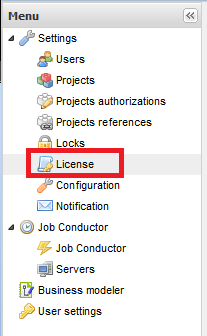
  4. Click on “License” in the left pane:


Click Browse in the center pane:
   Locate and select the “license” file

 Click “Upload”:

The license should now be installed and the TAC will no longer display the “License will expire” message.

Happy Talending!

Friday, October 14, 2011

How to execute multiple sql statements in Talend


Firstly, Why would you want to execute multiple SQL statements in a single Component?
  1. Ease of use and cleaner code. If all you are doing is a series of SQL statements, then you might be better off with a single SQLRow component than a train of Talend components making your job look messy. For Ex - If you are truncating the staging tables in a Data Warehouse environment, then a single Talend component is convenient
  2. It might be better if you create a store procedure for this purpose but sometimes, you might not have create-store-procedure-privilege on your schema. Then executing a series of SQL statements in SQLRow component by changing the "Additional JDBC parameters" setting as shown above might be the right thing to do.
We need to supply additional JDBC parameters because MYSQL jdbc driver, by default permits running only one query per jdbc connection and terminates after finding the first semi-colon (;). Above is a screenshot of how to modify the jdbc parameters.

Happy Talending!
-Praveena

Friday, October 7, 2011

Talend ELT Components

Purpose of the ELT Talend Components :

The ELT Talend components (Input, Mapper and Output) are useful for bulk loading the tables by pushing the processing overhead to the Database server rather than iterating through the resultsets in memory.

Example ELT Components for MYSQL. 

The three components (input, map, output) are closely tied and have to be used together.
  1. tELTMySqlInput
  2. tELTMySqlMap
  3. tELTMySqlOutput
 What can you do with ELT Components :
  1. The main purpose of the ELT components is PERFORMANCE.
  2. Bulk read/insert into tables by using different tables and all types of JOINS, WHERE clauses and GROUP BY and HAVING clauses.
What can you NOT do with ELT Components :
  1. You cannot JOIN tables from different SCHEMAS which means that the tables should be sourced from the same database schema.
Things to keep in mind when using the ELT_Mapping component

It always helps to check the SQL generated for us in the "Generated SQL" tab of editor of the ELT_Mapping component for syntax errors.

Happy Talending!

-Praveena


Wednesday, October 5, 2011

Talend GOTCHA when connecting SubJobs

Novice Talend users must pay special attention when you are connecting sub-jobs. You might want to connect the SubJobs with "On Subjob OK", "On Component OK" but might accidentally select "iterate" option from "ROW" instead of "On Subjob OK" from "TRIGGER".

A picture could perhaps clarify the above blah-blah.


Happy Talending!
-Praveena

Tuesday, September 13, 2011

How to install MYSQL on ubuntu

Open a terminal window, and use the following command:

sudo apt-get install mysql-server

If you are running PHP you will also need to install the php module for mysql 5:

sudo apt-get install php5-mysql

Thursday, September 8, 2011

Introduction to Talend

Talend is an open source software for Data Integration that is quickly becoming an alternative to expensive ETL tools in the BI space.

Talend has its presence in four areas especially, the Data Quality, Data Integration, Master Data Management and Application Integration.

Talend projects could be developed in Java or PERL. Talend has around 450 components currently and Talend's community has contributed many interesting components like tGoogleAnalytics.

TOS is the Talend's Open Studio for developing Talend jobs individually and TIS is the Integration Studio for collaboration.

Talend's version control is called SVN. TOS comes with a demo JAVA project that has sample jobs for quickly learning Talend in action.

I will try to post a sample job everyday in this blog of my-experiments-with-Talend.

Happy Talending!!