Showing posts with label TOS. Show all posts

Thursday, October 31, 2013

How to run Jobs remotely on TIS?

If you have JobServer installed on your box, then running Jobs remotely involves two steps.

1) Configure your TIS to point to the remote Job Server
2) Run the Talend Job fro the studio on the remote Job Server.

Once you configure your remote job server in the TIS preferences, you can run the job remotely by configuring the Target Exec tab of "Run" Talend Job.


I do not have Job Server installed. But if you do, you could run the Talend Job from your local studio on a remote server. Very handy!

Happy Talending!
Praveena


Diff Tool in Talend - Compare Jobs

Often times, we need to do a comparison between different versions of Talend Jobs. It could be for troubleshooting purposes or for logging the "Release Notes" for developers to help with maintenance.
A very useful feature for diffing purposes is "Talend's Compare Job" available only in TIS. This could save lot of time for developers to understand what has changed (especially with minor changes) without even opening the job.

Screenshots follow.


The save to HTML file is very useful when we are trying to log all the changes in a release by running the diff on the DELTA of files that have been modified in a release.

Happy Talending!
Praveena


Talend Migration from 4.X to 5.X

Recently, we started working on Talend Migration from 4.X to 5.X. One biggest surprise we encountered was, the Talend migration of jobs happens automatically without a message for confirmation.

Something in lines of "The migration is about to start. Do you want to proceed, Yes/No"

This means that if you opened a Talend 4.X job in TIS/TOS 5.X studio, the job is automatically migrated to 5.X. Since, we had an unplanned/accidental migration, we had to revert the code back to 4.X in sub-version. But we had several issues when reverting the code back. This post is to share our experiences about the migration.

Cannot find Talend.Project error. Classic error!! If you look in your subversion, you would see the talend.project file but the studio complains that it cannot find it. We still do not know which one action solved this error but doing the following helped us resolve the error.


  1. Release all the locks in Talend using TAC.
  2. Make sure that the project url to subversion is reachable.
  3. Make sure that the account used to add a project in subversion has sub-version access privileges to the project.
  4. Make sure that the project references has the authorization set up properly.
  5. Make sure that the subversion url is valid and the credentials are good.
  6. Make sure each user in the TAC has an svn login configured.
Cannot give a detailed screenshots for this exercise but let me know if you run into a similar issue during migration. Would be happy to help!

Error - Talend.Project doesn't exist


Happy Talending!
Praveena


Monday, October 21, 2013

DataViewer - a useful feature to preview data

Many a times, we might be maintaining others code and would like to see what a component is retrieving. The DataViewer is a gem hidden in the context menu that could be quite useful to preview data.

Right Click on the DbComponent will give us the DataViewer for previewing data. 

Happy Talending!
Praveena

Wednesday, October 16, 2013

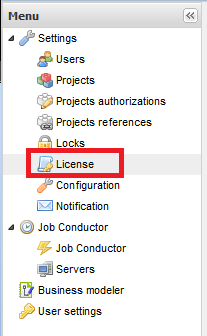
Steps to install/upgrade Talend license

The following are the steps to upgrade the Talend license on a Talend Administration Console (TAC) server:

  1.   Copy the licence file to /usr/local/talend-cmdline/
  2.    Restart the Commandline application:  (kill the running process and then run:   “nohup ./commandline.sh &”)
  3. Open TAC and log in.  

  4. Click on “License” in the left pane:


Click Browse in the center pane:
   Locate and select the “license” file

 Click “Upload”:

The license should now be installed and the TAC will no longer display the “License will expire” message.

Happy Talending!

Friday, October 7, 2011

Talend ELT Components

Purpose of the ELT Talend Components :

The ELT Talend components (Input, Mapper and Output) are useful for bulk loading the tables by pushing the processing overhead to the Database server rather than iterating through the resultsets in memory.

Example ELT Components for MYSQL. 

The three components (input, map, output) are closely tied and have to be used together.
  1. tELTMySqlInput
  2. tELTMySqlMap
  3. tELTMySqlOutput
 What can you do with ELT Components :
  1. The main purpose of the ELT components is PERFORMANCE.
  2. Bulk read/insert into tables by using different tables and all types of JOINS, WHERE clauses and GROUP BY and HAVING clauses.
What can you NOT do with ELT Components :
  1. You cannot JOIN tables from different SCHEMAS which means that the tables should be sourced from the same database schema.
Things to keep in mind when using the ELT_Mapping component

It always helps to check the SQL generated for us in the "Generated SQL" tab of editor of the ELT_Mapping component for syntax errors.

Happy Talending!

-Praveena


Wednesday, October 5, 2011

Talend GOTCHA when connecting SubJobs

Novice Talend users must pay special attention when you are connecting sub-jobs. You might want to connect the SubJobs with "On Subjob OK", "On Component OK" but might accidentally select "iterate" option from "ROW" instead of "On Subjob OK" from "TRIGGER".

A picture could perhaps clarify the above blah-blah.


Happy Talending!
-Praveena

Tuesday, September 13, 2011

Subversion error - Working copy of a particular job is locked

If you run into “subversion error.. working copy of /jobName is locked"..

You can unlock a job in two ways.

  1. Execute the following command to unlock your job. (My TIS 4.2 is on Ubuntu)

    find /TalendWorkspaces/ -name lock |xargs rm
  2. Open the TIS/TOS
    go to Navigator--->your project name folder--> Delete the two files of old version job: jobName_oldVersion.item, jobName_oldVersion.properties, then return back to repository viewer and click on 'refresh' button.
( If you cannot find Navigator, you can view it by going to Window--> Show view --> General --> Navigator. )

Happy Talending!!